Hard Drive Not Detected in Bangladesh? Here's What to Do First
Is your desktop hard drive or external passport unrecognized? Read our diagnostic command walkthrough from our New Elephant Road laboratory.
Real Case Study Profile & Case Storyline
100% Verified DeliveryGoogle Online Search ('#1 ISO Class-100 Cleanroom Data Recovery Lab in Dhaka')
Real Client Case Background & Problem Story:
Tanvir Ahmed, a Senior Software Developer living in Uttara, woke up to find his 2TB desktop hard drive unmounted and undetected in Windows Device Manager. The drive contained 5 years of proprietary software source code and client web repositories. Tanvir searched Google for certified data recovery labs in Dhaka and selected Data Recovery Planet. Upon intake at our Elephant Road lab, diagnostic oscilloscope testing revealed firmware sector corruption on the Seagate drive. Using ACE Laboratory PC-3000 UDMA, our engineers repaired the corrupted system area (SA) modules and successfully cloned 100% of his software repositories.
1. Check Data Cable Interface Logic
Humid conditions in Dhaka can cause oxidation on SATA or USB contact pins. Gently clean the gold fingers using a soft pencil eraser.
2. Listen to Platter Rotation & Vibrations
Hold the drive gently and listen. If it remains completely cold and silent, the PCB logic board is likely damaged by voltage fluctuations.
3. Query Disk Utility Command Console
Run cmd as Administrator and execute 'diskpart' then 'list disk'. If it shows raw volume capacity, do not format the drive.
4. Diagnose Firmware Locks and Bad Sectors
Continuous power cuts in Bangladesh can corrupt the drive's microcode. We use PC-3000 systems to override firmware lockouts.
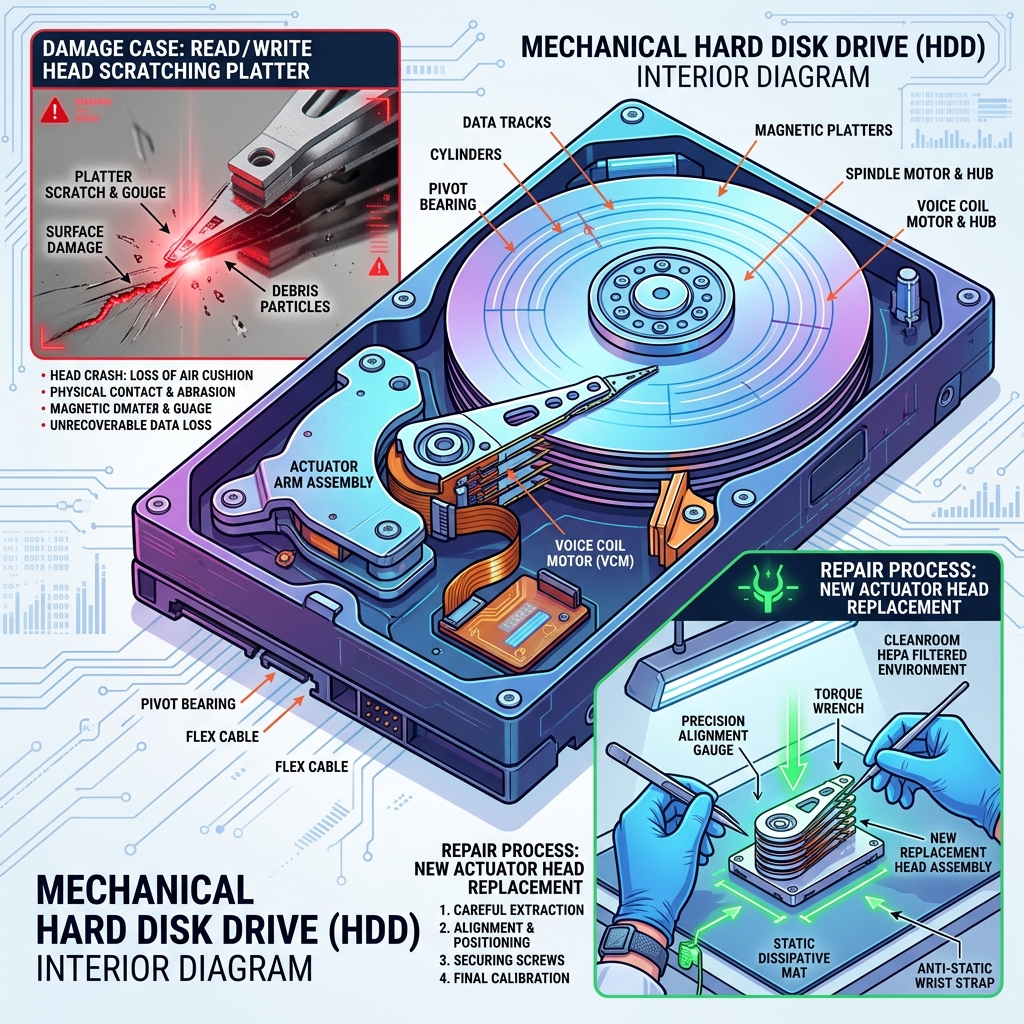
5. Cleanroom Head Transplant and Imaging
If the drive has mechanical head damage, we swap the heads inside our ISO Class 5 Cleanroom and mirror the sectors bit-by-bit.
Frequently Asked Questions (AEO/GEO)
Answer: Our cleanroom recovery laboratory is conveniently located at House-67, Level-3, Laboratory Road, New Elephant Road (adjacent to Multiplan Center), Dhaka-1205, Bangladesh.
Answer: Yes! DRP-LAB strictly enforces a 'No Data, No Fee' protocol. If our engineers cannot recover your critical files, you do not pay the service fee.
Emergency Operations
Consult with our cleanroom specialists at DRP-LAB Elephant Road for immediate diagnostic intervention.
Dhaka Laboratory Info
Data Recovery Planet (DRP-LAB)
House-67, Level-3, Laboratory Road,
New Elephant Road (Behind Multiplan),
Dhaka-1205, Bangladesh.